
From app brief to visual story
AppScreens Alternative: StoreScreens.ai vs AppScreens
Less arranging.
More creating.
Give your app a striking, coherent screenshot set. StoreScreens.ai generates the narrative, copy and artwork from your brief. Review the direction, refine the details and export.
Prefer editable templates and hands-on layout control? AppScreens offers that workflow, with AI assistance. Compare both below.
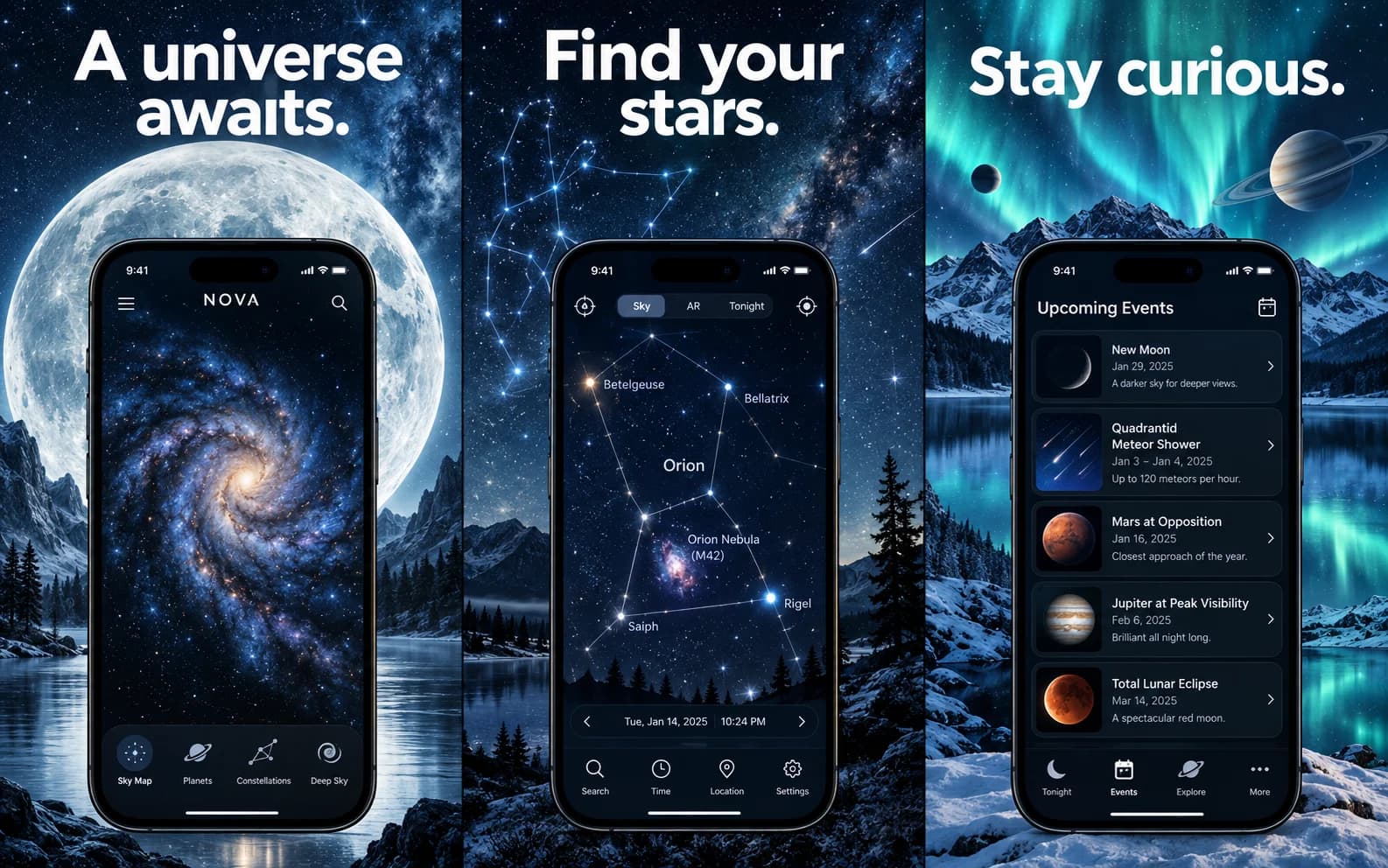
A sky guide for curious people. Lead with discovery, show the stars, then give them a reason to look up tonight.
StoreScreens.ai turns an app brief into a planned screenshot sequence, copy and generated artwork. AppScreens keeps the design in an editable layout. Both can help you build a complete set; the practical choice is how you want to create and refine it.
Last verified: . Written by StoreScreens.ai, an independent AppScreens competitor. Product details checked against our implemented workflow and AppScreens’ official product description.
StoreScreens.ai vs AppScreens at a Glance
StoreScreens.ai
Start with what your app does. AI proposes the message, sequence and design so you can focus on reviewing and refining the result.
The tradeoff: regenerating an image gives you less deterministic control than moving an individual layer.
AppScreens
Start with a template or layout, add your captures and shape the design. Its AI tools can help with setup and copy.
The tradeoff: you remain responsible for more of the layout and editing decisions.
Side-by-Side Comparison
Compare the work each product takes on, rather than treating every feature as a win or loss.
| Your workflow | StoreScreens.ai | AppScreens |
|---|---|---|
| Starting point | App brief, optionally with real screenshots or an imported app listing | AI-assisted setup, then a template or custom layout |
| AI role | Plans the sequence, writes headlines and generates screenshot artwork | Assists with onboarding, captions and restyling inside an editable project |
| Refinement | Give instructions and regenerate individual screens | Adjust text, layers, frames and layout directly |
| Real app captures | Used as visual references; review generated UI carefully | Placed into editable screenshot layouts |
| Localization | 40 supported languages; new language images use generation credits | Editable localized sets; language limits depend on plan |
| Delivery | Individual image downloads and ZIP folders by device and language | Responsive exports; paid plans also offer direct store uploads |
| Best fit | You want AI to propose the story and visual direction | You want reusable layouts and direct control over individual elements |
AppScreens workflow details: official product overview and editor documentation. Plan-dependent features: official pricing.
AI Generation vs Template Editing
In the StoreScreens App Store screenshot generator, the design and copy are generated together from your brief and references. You can ask for a different composition or message and regenerate a screen. This reduces the need to arrange each slide yourself, but still calls for editorial review.
AppScreens offers a layout you can keep editing across releases. Its AI support does not make it a purely manual tool. The useful distinction is generated image refinement versus direct layout editing, not “AI versus no AI.”
Design Workflow
StoreScreens.ai
- 01Brief & references
- 02AI narrative
- 03AI design
- 04Review & refine
- 05Export
AppScreens
- 01Template / editor
- 02Add app screens
- 03Edit
- 04Localize
- 05Export / upload
For a practical way to plan your first three screens, follow How to Create App Store Screenshots before choosing your design workflow.
Why Choose StoreScreens.ai?
Choose it when your hardest problem is deciding what the set should say and how it should look. AI can propose a benefit-led narrative and a consistent visual direction, then generate the screens.
That suits a solo maker or small team who wants to assess a concrete design before spending time on detailed layout decisions. Bring real app captures and a specific brief to make the result more relevant.
When AppScreens May Be Better
Prefer AppScreens when precise element placement, reusable brand layouts or a broader set of export targets matters most. Its editable workflow is useful when routine releases involve swapping captures while keeping the surrounding design.
It is also worth considering when your release process depends on direct store uploads. These strengths are documented in its product overview.
Pricing
The billing models are different: StoreScreens includes image-generation credits; AppScreens prices editor access and plan limits. These are USD list prices. Annual amounts below are billed for the full year, not monthly payments.
StoreScreens.ai
Pro: $29/month for 400 credits (40 standard images). Annual: $261/year, equivalent to $21.75/month, with 4,800 credits per year.
Luxury: $60/month for 1,000 credits (100 standard images). Annual: $540/year, equivalent to $45/month, with 12,000 credits per year.
Standard image generation costs 10 credits. Regeneration and new language images also consume credits, so your finished set count depends on iteration. Check StoreScreens pricing for the available plans.
AppScreens
Free: $0. One project and up to five screenshot exports; premium features have watermarks. No card required.
Pro: $25/month or $99/year ($8.25/month equivalent). Scale is listed at $180/year ($15/month equivalent).
AppScreens has the lower paid starting price here. Compare its current plan limits and checkout with the generation allowance you need. Taxes may apply.
The StoreScreens trial
Eligible new subscribers get 3 days and 30 credits—enough for 3 standard image generations. A payment method is required. The selected subscription starts billing after the trial unless you cancel beforehand. There is no permanent free generation plan.
Localization
StoreScreens supports 40 languages. Adding a language translates the screenshot copy and generates new images in a separate language folder. Budget for those images as well as any revisions, and have a fluent reader check the result.
AppScreens Pro includes up to 10 languages; Scale lists 80+ localizations. Its localization guide covers editable translations, text fitting, right-to-left layouts and per-language image changes. That control can matter when each market needs different app captures.
Export/Publishing
StoreScreens offers iPhone, iPad, Apple Watch, Android phone and Android tablet targets. Download individual images or a ZIP organized by device and language, then upload them through your store console. It does not currently publish directly to App Store Connect or Google Play.
AppScreens provides responsive exports and paid direct uploads to both stores. In either workflow, review the final files against App Store Screenshot Sizes and use the free Screenshot Size Checker for a technical dimension check. Matching dimensions alone does not guarantee store acceptance.
Who Each Tool Is Best For
Choose StoreScreens.ai if you want to delegate the initial narrative, copy and visual direction to AI and refine from a generated set. It is particularly useful when you do not want to design every slide yourself.
Choose AppScreens if you already have a layout direction, need to adjust individual elements or want to manage repeated releases through an editable project. Use your own app and one release-sized brief to compare the effort and output quality before committing.
Switching From AppScreens to StoreScreens.ai
- Gather your originals. Keep the raw app captures, approved headlines, brand colors and any references you have permission to use.
- Write a focused brief. Explain your audience, main benefit and what each screen must show. You can also import app listing context into StoreScreens.
- Generate and review. Check the sequence, spelling, visual consistency and fidelity to the real interface. Refine screens that need changes.
- Export and validate. Select your device and language folders, download the files and inspect them before replacing your store assets.
This is a new design workflow, not an AppScreens project conversion. Use our App Store Asset Sizes guide to plan the rest of your release creatives.
StoreScreens.ai vs AppScreens FAQ
What is the best AppScreens alternative for AI-generated screenshot sets?
StoreScreens.ai is a strong fit if you want a brief to become a screenshot sequence with generated copy and artwork. The best choice depends on whether you prefer reviewing generated designs or editing a reusable layout yourself.
Does AppScreens also use AI?
Yes. AppScreens has AI-assisted onboarding, captions and restyling. The distinction is where AI sits in the workflow: StoreScreens centers on generating images, while AppScreens combines AI assistance with an editable layout workflow.
Is StoreScreens.ai cheaper than AppScreens?
No blanket claim applies. The paid starting prices shown on this page favor AppScreens. StoreScreens subscriptions include image-generation credits, so compare the work you want the tool to do as well as the subscription price.
Can I try StoreScreens.ai for free?
Eligible new subscribers can start a 3-day trial with 30 credits, enough for 3 standard image generations. A payment method is required. Cancel before the trial ends to avoid the selected subscription charge; this is not a permanent free generation plan.
Can I import an AppScreens project?
There is no native AppScreens project import. Start with your original app captures, app description and brand direction. Existing exported images do not become editable layers in StoreScreens.
Will generated screenshots preserve every pixel of my app?
Do not assume pixel-perfect preservation. Uploaded captures guide generation. Inspect the resulting interface, labels and claims before publishing, especially when an exact reproduction of your product is essential.
Create your screenshot set with StoreScreens.ai
Bring your app brief and real screens. Let AI propose the narrative and design, then refine the result for your release.
Your next great launch starts with 3 days free.